 Vision Bot Studio
No-code automation for games
Stop scripting clicks. Teach it your game instead.
Most macro tools replay a fixed list of clicks, and one unexpected popup breaks everything. Vision Bot Studio learns the scenes of your game and what you can do in each one, so it always knows where it is, finds its own way to where it needs to be, and recovers when something goes wrong.
7-day free trial · Windows, Linux and Android emulators · Cancel anytime
Why it's different
Macro recorders break the moment something is different
A recorded click list has no idea what's on screen. Vision Bot Studio works from a map of your game, not a script.
A typical macro recorder
- One fixed list of clicks and key presses
- No idea which screen it's actually on
- Breaks when a popup or loading screen shows up
- You re-record everything after a game update
Vision Bot Studio
- Scenes and actions, not a fixed click order
- Always knows which scene it's in
- Finds its own route to where it needs to go
- Gets itself unstuck, and restarts the game if needed
How it works
Three steps, then it runs on its own
Capture your scenes
Make a scene for each screen or area of your game (main menu, inventory, a town) and capture what identifies it. Add the actions available there: buttons that lead to other scenes, things to click, read or check.
Describe a scenario
"Go to the shop and buy potions." "Go to the arena and collect the reward." Each step says which scene to go to and what to do there. No scripting, no coordinates to type.
Press Start
The bot works out the route to each scene by itself, runs your actions, repeats on your schedule, and recovers when something unexpected happens on the way.
Features
Everything it can do
Far more than click sequences, and all of it set up with the mouse.
Image and text recognition
Click images or text wherever they appear on screen, read numbers and words, and check health or resource bars.
Finds its own way
Navigate actions connect your scenes into a tree map. The bot routes from wherever it is to wherever it needs to be by reading the tree map. This also allows it to auto-recover from many situations when something unexpected shows up.
Smart scheduling
Cooldowns, run limits and prerequisites, so a scenario only runs when its conditions are met. Background scenarios handle things like drinking a potion at low health.
Real controls
Drag sliders to a value, pick radio options, scroll lists, hold keys and drag paths, not just single clicks.
Navigate using the minimap
Record a fixed map once and walk to its waypoints, or let the bot find its own way through randomly generated areas like dungeons and rifts: walk to icons, explore every corner, or roam to farm resources.
Object recognition with AI models
Train your own object-detection model in the app to find monsters, resources or players that don't look the same twice.
AI Helper and AI Generate
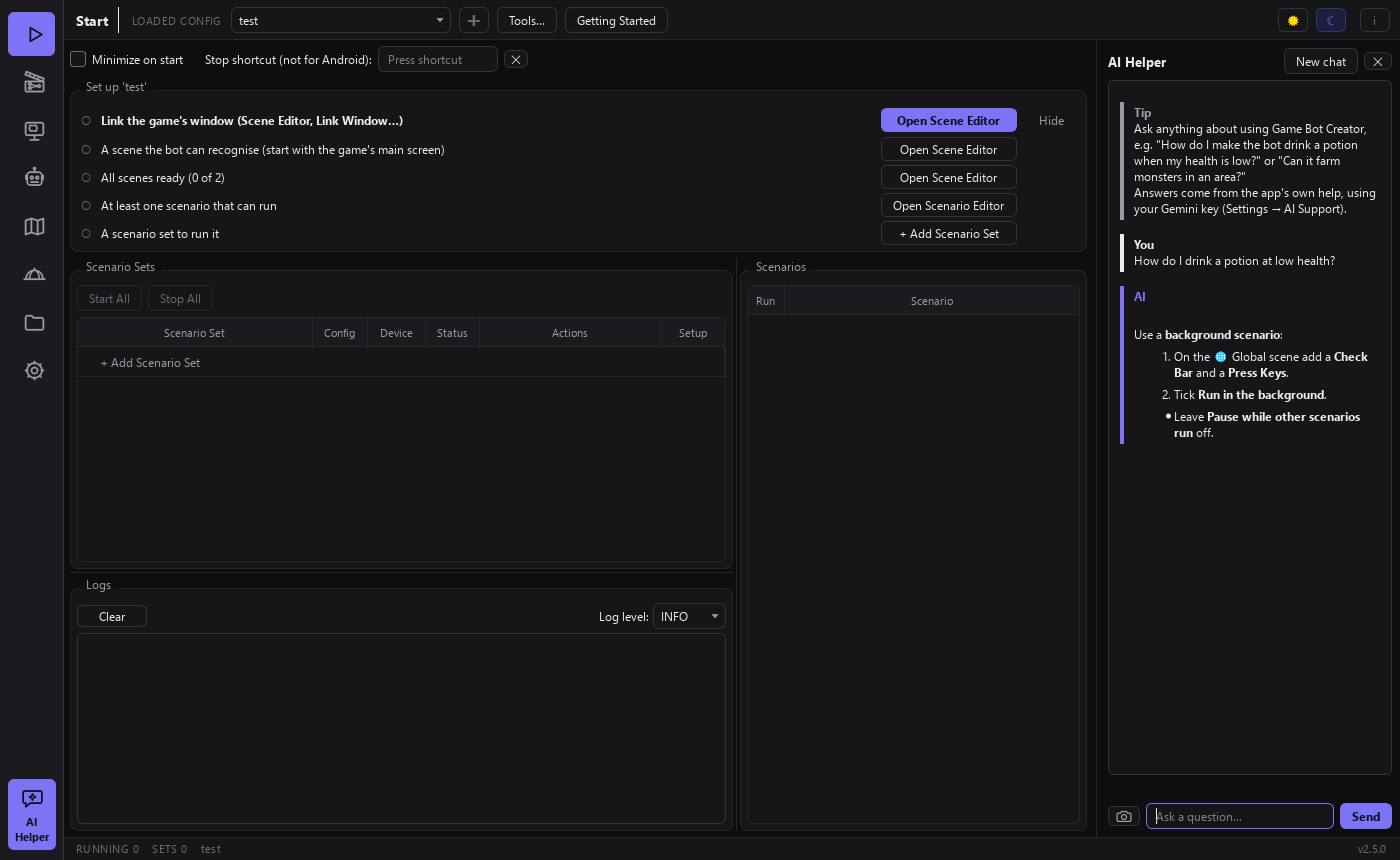
Ask the built-in AI Helper how to set something up, or let AI draft a scene or scenario from a screenshot for you to review. Your questions and screenshots are never used to train AI.
Desktop and Android
Automate a Windows or Linux game window, or Android games in the free MuMu Player emulator or on a phone over ADB. Run several at once.
Share configs
Browse configs other players have published for Android games, download one and run it, or share your own.
A closer look
Every action a scene can use
Pick an action from the list, drag a box around it on your game, done. Scenarios then chain scenes and their actions into a full routine.
| Action | What it does |
|---|---|
| Navigation | |
| Navigate | Find an image and click it to move to another scene |
| Back | Leave this scene, back to wherever you came from |
| Go To Waypoint | Walk to a named spot on a recorded map Minimap |
| Go To Icon | Walk to an icon shown on the minimap, such as a portal or quest marker Minimap |
| Explore | Walk every part of a randomly generated area Minimap |
| Roam | Walk around an area to farm monsters or resources Minimap |
| Walk To | Walk toward a landmark a trained model recognises Minimap AI |
| Clicking | |
| Click Image | Click wherever a captured image is found |
| Click At | Click a fixed point, no image matching |
| Click Text | Click any listed text found on screen, for example loot |
| Detect Model | Click whatever a trained model detects AI |
| Checks | |
| Check | True when a captured image is on screen |
| Check Text | Read a number or word on screen and compare it |
| Check Bar | Read how full a health or resource bar is, even without a printed number |
| Check Model | True when a trained model detects something AI |
| Input | |
| Press Keys | Send a key sequence, for example an ability rotation |
| Drag | Click-and-drag or swipe from one point to another |
| Scroll | Scroll a list up or down |
| Slider | Drag a slider to a value |
| Radio | Pick one of several on-screen options |
| Simple Pathing | Record a route once and replay it, corrected for real movement speed Minimap |
| Training data | |
| Frame Capture | Save game frames for training an AI model while the bot runs AI |
Minimap needs the minimap tool, AI a trained detection model. Both are optional per game.
Pricing
Try it free for 7 days
Everything included, AI features too. Cancel anytime.
Monthly
€14.99
per month, incl. VAT
- The full app on 2 PCs
- 500 AI credits to start, then 250 every month
- Windows and Linux, Android emulators
- All updates included
2 months free
Yearly
€149
per year, incl. VAT
- The full app on 2 PCs
- 500 AI credits to start, then 250 every month
- Windows and Linux, Android emulators
- All updates included
AI credits
AI credits pay for the AI Helper, AI Generate, auto-labeling and model training, which run on our servers: no accounts or API keys to set up. Your questions and screenshots aren’t used to train AI: we use Google’s paid Gemini API, which doesn’t use them to improve its products. 250 credits are roughly 50 AI Helper questions, 16 generated scenes, 250 auto-labeled images or 45 minutes of model training. Need more? Top up anytime in the app: €10 for 1,000, €25 for 2,750 or €50 for 6,000 credits. Bought credits don't expire.
The 7-day trial includes 20 AI credits, one trial per PC. Secure checkout by Paddle: card, PayPal, iDEAL, Apple Pay, Google Pay. Your license key arrives by email.
Download
Get the app
The app asks for your license key on first start.
Download for Windows Download for Linux
| System | Requirements |
|---|---|
| Windows | Windows 10 or 11, 64-bit |
| Linux | 64-bit (x86_64), Ubuntu 22.04, Debian 12, Fedora 36 or newer |
| Android | MuMu Player on Windows, Waydroid on Linux, or a phone or tablet with USB/wireless debugging |
| AI on your own PC (optional) |
|
Tutorials
Step-by-step guides
The app's AI Helper (bottom of the sidebar) answers questions too.
FAQ
Questions
Do I need to know how to program?
No. You capture images by dragging a box on your game, pick actions from a list, and arrange steps in the Scenario Editor. The Getting Started tutorial and the built-in AI Helper walk you through it.
What happens when something unexpected pops up?
The bot always checks which scene it's in. If it doesn't recognise the screen, it backs out step by step, and if it stays stuck it restarts the game by itself. It also waits out loading screens and animations before clicking.
Which games does it work with?
Any game you can see on screen: it works from screenshots and mouse, keyboard or touch input, and doesn't read or change the game's memory or files. Whether automation is allowed is up to each game's own rules, so check those before you run a bot.
Does it work with Android games?
Yes, in the free MuMu Player emulator on Windows, Waydroid on Linux, or on a real phone or tablet over ADB. You can run several emulator instances at the same time.
Do the AI features cost extra?
Your subscription starts with 500 AI credits and includes 250 more every month; the monthly credits renew each month and don't carry over. If you use more, top-up packs are available in the app, and bought credits never expire. The app shows what each AI feature costs; model training shows a fixed price before you start. You're never charged more than you have.
Can I auto-label and train AI models on my own PC?
Yes, for free and without credits, if your PC can handle it: auto-labeling needs an NVIDIA graphics card with 6 GB of video memory or more, training one with 8 GB or more (8 GB is on the edge and can run out of memory, especially with the game open, so 12 GB or more is recommended), plus 16 GB RAM and about 8 GB of free disk space. The app downloads what it needs once (2.5 to 4.5 GB). Without a suitable card it runs on the processor, which is much slower, or you can use AI credits instead. See the system requirements.
Why do I specifically need an NVIDIA graphics card?
The AI models used for auto-labeling and training run on NVIDIA's CUDA technology, which only NVIDIA graphics cards support. AMD and Intel graphics cards can't run them, so on those PCs the app uses the processor instead, which works but is much slower. Using the trained model in your bots works on any PC.
How does the free trial work?
Pick monthly or yearly and start the 7-day trial; you add a payment method, but you're only charged after 7 days. Cancel before then and you pay nothing. The trial includes 20 AI credits (one trial per PC). Want your 500 starting credits right away? Start your subscription early from inside the app.
On how many PCs can I use it?
On 2 PCs at a time. You can move the license to another PC yourself from inside the app.
How do I cancel, and can I get a refund?
Cancel anytime from the link in your receipt email or in the app; you keep access until the end of the period you paid for. If a payment went wrong or you forgot to cancel, email us within 14 days. See the refund policy.